
By
Gigabit Systems
August 23, 2026
•
20 min read
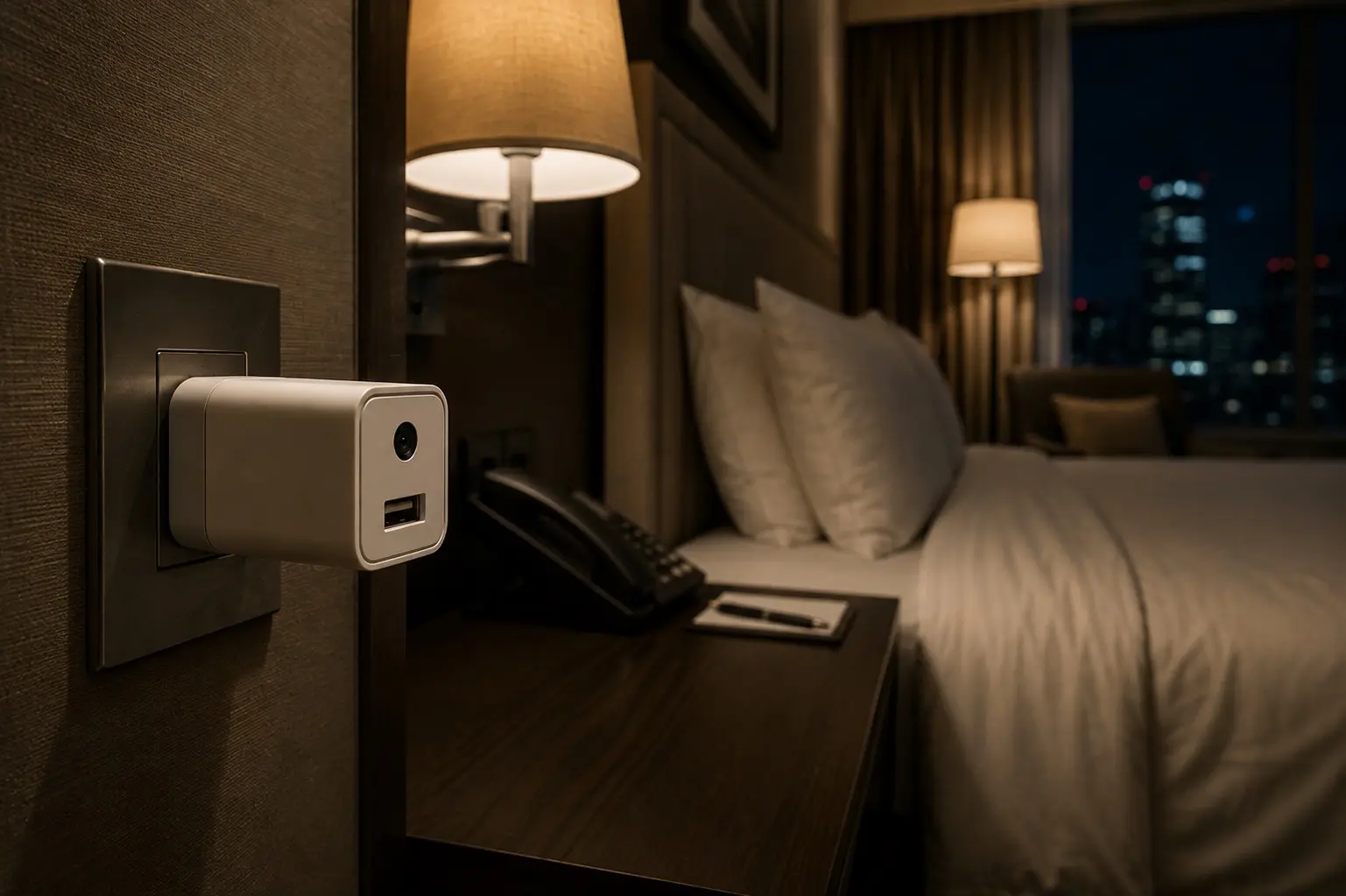
Someone Hid a Camera in a Hotel Charger. Would You Spot It?
The charger beside your bed may not just be charging.
You check into a hotel.
Drop your suitcase.
Connect to Wi-Fi.
Plug in your phone.
Lock the door.
Maybe check that the deadbolt works.
And then you assume you’re alone.
A hotel guest recently reported discovering something considerably more disturbing:
A Wi-Fi-enabled camera concealed inside what appeared to be an ordinary power adapter.
According to the person who reported finding it, the device was capable of transmitting live video remotely. Hotel management denied involvement.
Whether every technical detail of that individual incident can ultimately be verified or not, the hardware behind the threat is very real.
Tiny cameras can be hidden inside everyday objects.
Chargers.
Alarm clocks.
USB adapters.
Smoke detectors.
Picture frames.
Pens.
Wall clocks.
And other objects you’d barely notice in a hotel room.
The cybersecurity lesson is uncomfortable:
Sometimes the device watching you doesn’t look like a camera.
You Don’t Need to Become a Spy Hunter
I don’t think people should spend the first hour of every vacation dismantling hotel rooms.
That’s not practical.
And you absolutely should not start unscrewing smoke detectors, opening electrical equipment or taking apart hotel property.
Instead, add something simple to your normal check-in routine.
You already:
Lock the door.
Put valuables in the safe.
Check where the exits are.
Now spend a few minutes checking the things pointed toward places where you reasonably expect privacy.
Here’s how.
Step 1: Stand at the Foot of the Bed
Before unpacking, stop.
Look around the room from the perspective of someone trying to record you.
Don’t inspect everything equally.
Ask:
What has a clear line of sight to the bed?
Then the bathroom.
Then the changing area.
Look closely at:
Smoke detectors.
Alarm clocks.
USB chargers.
Power adapters.
Picture frames.
TV equipment.
Air vents.
Lamps.
Wall fixtures.
Anything strangely positioned.
You’re looking for something simple:
A tiny unexplained opening or dark reflective circle.
A camera needs to see.
That means somewhere, somehow, there generally needs to be an optical path between the lens and the room.
Physical inspection remains one of the most useful first checks.
Step 2: Audit the Things Plugged Into the Wall
This is particularly relevant to the reported hotel incident.
Look at electronics you didn’t bring.
An ordinary USB charger shouldn’t have a mysterious pinhole pointed toward your bed.
Neither should an alarm clock.
Neither should a random power adapter.
Pay attention to objects that seem unnecessary.
Why is this here?
What does it power?
Why is it positioned this way?
Does it have a tiny lens-like opening?
Does it have an unexplained microSD slot?
Does the object look modified?
Don’t open suspicious electronics.
Don’t destroy them.
And don’t start pulling apart hotel electrical fixtures.
If something looks genuinely suspicious, stop handling it and document what you see.
More on that in a minute.
Step 3: Turn Off the Lights and Use a Flashlight
Here’s a trick that doesn’t depend on the camera being connected to Wi-Fi.
Darken the room.
Take your phone’s flashlight and slowly shine it toward suspicious objects while looking from roughly the same direction as the light.
Camera lenses can produce a sharp reflection.
You’re looking for a tiny, unusual glint.
Move around slightly because lens reflection depends heavily on angle.
This isn’t foolproof.
A screw, LED or shiny piece of plastic can reflect light too.
But unlike a Wi-Fi scan, a flashlight doesn’t care whether the suspected camera is:
Wireless.
Wired.
Recording to an SD card.
Connected to another network.
Or disconnected from the internet.
You’re looking for the lens itself.
Step 4: Try the Infrared Trick
This is the trick that gets shared all over social media.
And yes, it can work.
Many inexpensive security cameras use infrared LEDs for night vision.
Your eyes can’t see infrared light.
Some smartphone camera sensors can.
First, test whether yours does.
Grab a TV remote.
Open your phone’s camera.
Point the remote at it and press a button.
If you can see the remote’s emitter flashing on your screen while you press it, you’ve confirmed that particular camera can detect at least some infrared.
Now darken the hotel room.
Slowly scan suspicious areas through your phone.
You may see tiny purple, white or pinkish points of light that aren’t visible with your eyes.
Investigate those locations visually.
But here’s the part TikTok videos often leave out:
No purple dots does not mean no camera.
A hidden camera may not use infrared.
Its IR LEDs may be turned off.
It may record perfectly well using visible light.
And different phone cameras filter infrared differently.
So this is a useful test.
It is not an all-clear button.
Step 5: See What’s on the Wi-Fi
A network scanner such as Fing can identify devices visible to you on a network.
You might see:
Smart TVs.
Access points.
Streaming devices.
Printers.
Phones.
IoT equipment.
And potentially cameras.
Names containing terms such as camera, IPCam, ESP32 or an unfamiliar device manufacturer can give you something worth investigating.
But again:
Don’t treat an unfamiliar device as proof somebody is spying on you.
Hotels can have enormous numbers of legitimate connected devices.
And there is an even bigger limitation.
Hotel Wi-Fi commonly isolates guests from other devices on the network.
A hidden camera might also:
Use another Wi-Fi network.
Create its own hotspot.
Use cellular connectivity.
Record locally.
Be wired.
Or simply be offline while you’re checking.
Fing itself describes network scanning as one method among several for detecting hidden cameras.
A clean network scan does not mean a clean room.
Don’t Forget the Bathroom
People instinctively check around the bed.
Check areas where someone would reasonably expect to undress too.
Look at anything with an unobstructed view toward:
The shower.
Toilet.
Changing area.
Bathroom mirror.
Again, don’t dismantle fixtures.
You’re looking for obvious anomalies:
Unexpected electronics.
Unexplained holes.
Oddly positioned objects.
Tiny reflective surfaces.
Something that simply doesn’t belong.
Here’s What I Would NOT Do
If you discover what genuinely appears to be a hidden camera, resist the cybersecurity instinct to become the investigator.
Don’t connect to it.
Don’t try default passwords.
Don’t scan its ports.
Don’t reset it.
Don’t remove its SD card.
Don’t log into it.
Don’t attempt to determine where it’s uploading footage.
Don’t take it home.
And don’t smash it.
You may destroy evidence or complicate an investigation.
One of the strongest responses to the original poster made exactly this point: preserve the evidence and get law enforcement involved rather than contaminating the chain of custody yourself.
If You Actually Find One, Do This Instead
First, leave the private area of the room and avoid changing clothes or having sensitive conversations there.
Photograph the suspicious object in place from multiple angles without unnecessarily manipulating it.
Record:
Your hotel.
Room number.
Date.
Time.
Where the object is located.
What made you suspicious.
Then contact hotel management and local law enforcement.
If you booked through a travel platform, report it there as well.
Request another room—or another hotel.
If you’re concerned about immediate privacy while waiting for help and can do so without disturbing evidence, simply leave the room.
The goal isn’t proving the case yourself.
Preserve what you found so someone qualified can investigate it.
Don’t Immediately Blame the Hotel
This is another important distinction.
Finding a camera inside a hotel room does not automatically prove the hotel installed it.
Hotels have:
Employees.
Contractors.
Maintenance workers.
Previous guests.
Outside vendors.
Large numbers of people moving through rooms.
That’s part of what makes the situation difficult.
If something suspicious is found, determine who installed it through an investigation rather than an assumption.
The hotel itself may also be a victim.
The Cybersecurity Parallel Is Bigger Than Hidden Cameras
There’s a reason I find this story interesting beyond travel safety.
The same security principle applies to businesses:
Know what’s connected to your environment.
Businesses routinely discover devices nobody in IT knew existed.
Security cameras.
Door controllers.
HVAC equipment.
Printers.
Digital signage.
Cheap IoT devices.
Conference-room equipment.
Vendor-installed gateways.
Random Wi-Fi equipment.
Each one is another computer.
Each one may have:
A password.
Firmware.
Network access.
A cloud account.
Remote administration.
Known vulnerabilities.
And potentially a camera or microphone.
Yet someone installed it three years ago and nobody remembers who owns it.
Your $40 Device Can Become My Cybersecurity Problem
Cheap connected devices are especially dangerous because they’re easy to deploy.
Plug it in.
Connect Wi-Fi.
Download an app.
Done.
Nobody calls IT.
Nobody calls the MSP.
Nobody performs a cybersecurity review.
Nobody changes the default configuration.
Nobody asks where the data goes.
Nobody asks how long the manufacturer supports it.
Nobody asks what country the cloud service operates from.
Then three years later:
“What is this thing on our network?”
That’s Shadow IT in physical form.
Businesses Should Inventory IoT Devices
Your managed IT provider should know what’s connected to your network.
At minimum, identify:
What the device is.
Who owns it.
Why it’s there.
What network it’s connected to.
Whether it needs internet access.
How it’s authenticated.
Whether firmware is current.
Who can remotely access it.
Whether it contains a camera or microphone.
Where its data is stored.
When it should be replaced.
If nobody can answer those questions:
Why does the device have network access?
Hotels Have an Especially Difficult Security Problem
Think about the environment.
Hundreds of rooms.
Thousands of guests.
Contractors.
Housekeeping.
Maintenance.
Televisions.
Access-control systems.
Wi-Fi.
Smart thermostats.
Digital locks.
Cameras.
Building automation.
Payment systems.
Guest networks.
Corporate networks.
It’s an enormous attack surface.
Hotel cybersecurity cannot stop at protecting the reservation system and front-desk computers.
Physical technology needs governance too.
Four Minutes Won’t Guarantee You’re Safe
I wouldn’t promise that.
Anyone who tells you a phone app can guarantee a hotel room contains no surveillance equipment is giving you false confidence.
A sophisticated camera can be:
Extremely small.
Wired.
Recording locally.
Dormant.
Not using infrared.
Connected through a network you cannot see.
No consumer trick detects everything.
But that’s not a reason to do nothing.
Security is rarely about eliminating 100% of risk.
It’s about making simple habits routine enough that obvious threats don’t succeed.
Make It the New Hotel Check-In Routine
You don’t need to become paranoid every time you travel.
Make the process boring.
Walk in.
Lock the door.
Check the bed’s line of sight.
Look at unfamiliar electronics.
Darken the room and do a flashlight sweep.
Test for infrared if your phone supports it.
Optionally check visible network devices.
Then enjoy your trip.
It takes a few minutes.
And just like checking that your hotel-room door actually latched behind you, eventually it becomes something you barely think about.
Because cybersecurity isn’t always:
Firewalls.
MFA.
EDR.
Encryption.
Sometimes it’s standing at the foot of a hotel bed and asking one extremely simple question:
“What in this room can see me?”
70% of all cyber attacks target small businesses, I can help protect yours.
#Cybersecurity #TravelSafety #DataPrivacy #IoTSecurity #DataProtection
Before you plug into that hotel charger, look closely. Someone recently found a Wi-Fi camera hiding inside one.